

You're about to spend more on marketing in the next few weeks than any other period this year. Your team is (hopefully) coordinating efforts across paid social, email, SMS, affiliates, organic posts, display ads, and influencer partnerships.
Have you thought about how exactly you will evaluate each of those strategies individually and collectively?? If not, don’t worry, you’re not alone.
Here's what happens at most companies: Each channel manager creates their tracking links independently. Social uses one naming convention. Email uses another. Paid search has been doing their own thing since 2019. And come December, you're sitting in a meeting asking "Which promotion actually drove sales?" and your analytics person is frantically trying to categorize hundreds of inconsistent UTM parameters manually.
The result? You have no idea which creative outperformed across channels. You can't tell if your early-bird discount worked better than your doorbuster. And you're making decisions about next year's budget based on incomplete data.
The fix isn't complicated, but it requires something most marketing teams skip: a comprehensive UTM plan built before a single link goes live.
Let's get it done 💪

Skip to what you need
Why Your BFCM Tracking Is Probably Broken
Most UTM failures fall into two categories:
1. Inconsistent naming: Your social team tags links with "utm_source=Facebook" while your paid social team uses "utm_source=meta_fb". In Google Analytics 4, these are two completely different traffic sources. You'll never be able to answer "How did Facebook perform overall?"
2. Incomplete forward thinking: You tag for today's reporting needs without considering future questions. You put the promotion name in utm_campaign, but six months from now when you want to know "Did lifestyle content or product-focused content drive more revenue?", you have no way to answer it because you never captured content type anywhere in your UTMs.
The more insidious problem is that these issues compound during high-volume periods like BFCM. When you're running 47 different campaigns across 12 channels with 6 different creative variants, inconsistent UTM structures don't just make reporting harder… They make it functionally impossible.
Start With an Audit: What Are You Actually Running?
Before you build a single UTM, you need to map your entire BFCM strategy.
Gather your channel managers and creative teams. List out:
Every channel/platform you'll be using:
Meta (Facebook, Instagram)
TikTok
Google Ads (Search, Display, YouTube)
Email (promo blasts, segmented campaigns, automated flows)
SMS
Affiliates and partners
Organic social posts (yes, these need UTMs too)
Influencer partnerships
Every promotion or offer you're running:
Early access for VIPs (starts 11/20)
Black Friday doorbusters (11/24)
Weekend flash sales
Cyber Monday exclusive
Cyber Week extensions
Product bundles
Free shipping thresholds
Every significant creative variant:
Hero product A vs. Hero product B
Lifestyle photography vs. product-on-white
Video vs. static
UGC testimonials vs. brand-created content
"Shop now" vs. "Limited time" vs. specific discount callouts
Every audience segment (if you're personalizing):
Past purchasers vs. prospects
High-value vs. general audience
Geographic segments
Product interest categories
Now, here's the crucial strategic question...
What questions will you need to answer in January when you're planning next year?
Will you need to know:
Which product drove the most revenue across all channels?
Did paid or organic social perform better?
Did your Saturday flash sale outperform your Monday exclusive?
Whether lifestyle content or product photography converted better?
Which type of influencer deserves a bigger slice of the budget next go around?
Are video ads justified despite their higher production cost?
Every one of these questions requires specific information to be captured in a specific place within your UTM structure.
Building Your UTM Structure: What Goes Where and Why
Here's where most companies go wrong: they treat UTM tags as an afterthought rather than a strategic taxonomy. Your UTM structure should map to your business questions.
Remember: The goal is to have all the information you need available and in the right place so you can group and isolate data as needed.
If you need a good place to start, try this Canva template.
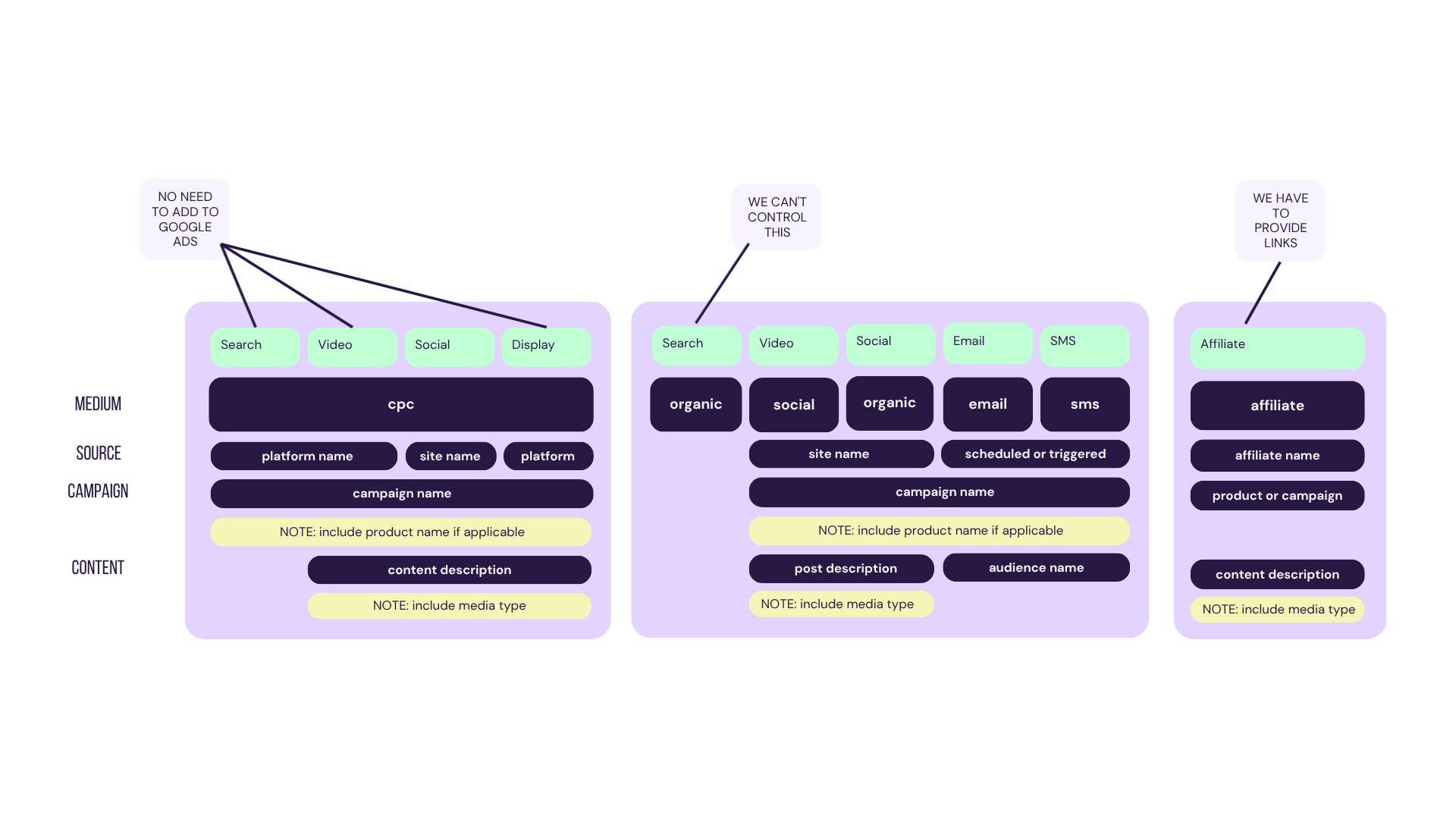
Let's look at the five UTM parameters and what they should actually represent:
utm_source: The Platform
This answers: "Where was the user before they clicked?"
Create your list of utm_source options. Example:
meta_facebookmeta_instagrammeta(when it's unclear which property)tiktoklinkedintwitteryoutubeemailsmsgoogle(for Google Ads)
BFCM consideration: Don't let individual campaign managers create source values. If three people tag Facebook three different ways, you've lost the ability to see "all Facebook traffic" in your reporting.
utm_medium: How You Got Them There
This answers: "What type of marketing activity brought them?"
This is where you differentiate paid from organic, ads from owned content. Based on your structure:
paid_social- Any money-behind-it social post (ads, boosted posts, dark posts)social- Organic social postspaid_search- Text ads on search enginespaid_display- Image-based ads (not on social)paid_video- Video ads (not on social)blast- One-time sends to your owned lists (email/SMS)flow- Automated drip sequences
BFCM consideration: This is where you establish whether something is paid or owned, which directly impacts how GA4 will categorize your traffic (more on this in a moment). Consistency here is non-negotiable.
utm_campaign: The Strategic Initiative
This answers: "What phase/promotion/targeting was this part of?"
This is where your forward-thinking audit pays off. You're tracking BFCM, but you might be running multiple phases with different audience targets. Your structure uses: phase-product/category-targeting
For BFCM, this might look like:
bfcm_early_access-accessories-past_purchasersbfcm_bf_doorbuster-hero_product-high_intentbfcm_cm_exclusive-new_product_line-cold_audiencebfcm_cyber_week-all-remarketing
Why this matters: In February, when you're planning your spring launch, you'll be able to compare "Did early access targeting to past purchasers work better than main-event targeting to cold audiences?" across all channels.
The phase prefix lets you group all BFCM activity versus your ongoing campaigns. The product/category name lets you compare performance by what you're promoting. The targeting/list name lets you evaluate audience strategies.
utm_content: What Was In The Creative
This answers: "What type of content/pillar/theme was this?"
This is where you capture the substance of what you're promoting. Looking at your content taxonomy:
testimonial- Customer storiesproduct- Product-focused contentlifestyle- Aspirational/lifestyle contenttrends- Trending/timely contentugc- User-generated contentdemo- How to/ in-use content
Use standardized content themes (testimonial, product, lifestyle, ugc, demo) consistently across all channels. This lets you answer "Does lifestyle content convert better than product-focused content across all our marketing?".
utm_creative_format: The Execution Details
This is a custom parameter that captures format-level details AND the media type:
post_contentvsstory_contentvsstory_addarkpostvsboostlead_advsconversionvscollectionMedia variants:
short_form, long_form, carousel, image, textTest variants:
variant_a, variant_b, variant_c
BFCM example: You're running the same Black Friday offer with three video variants (30-second testimonial, 15-second product demo, 6-second urgency clip). Your utm_content is bf_doorbuster for all three, but utm_creative_format is:
testimonial-video_30secdemo-video_15sectrend-video_6sec
Come December, you can report on which video length/style drove better ROAS and apply those learnings to your next campaign.
The Critical Part Nobody Warns You About: GA4's Default Channel Groupings
Here's where your perfect UTM plan can still fail you: Google Analytics 4 doesn't report on raw UTM values by default. Instead, it forces your traffic into predefined channel groups based on very specific rules.
Your carefully tagged utm_source=meta_facebook and utm_medium=paid_social traffic? GA4 might be calling it "Paid Social" in reports. Or "Social". Or even "Unassigned" if your parameters don't match Google's expected patterns exactly.
The rules are strict and sometimes counterintuitive:
Paid Social requires: utm_medium matches
^(paid.social|paid_social_media)$OR utm_source matches social platforms AND utm_medium matches paid patternsOrganic Social requires: utm_medium matches
^(social|social-network|social-media|sm|social network|social media)$OR utm_source matches social platformsEmail requires: utm_source or utm_medium exactly matches
email|e-mail|e_mail|e mailPaid Search requires: utm_medium matches
^(.*cp.*|ppc|retargeting|paid.*)$AND utm_source matches search engines
Note: I've built a GA4 UTM creation tool specifically to help with this problem. When you build a link, it shows you which GA4 channel group that traffic will fall into based on Google's rules. This prevents the common issue where you think you're tagging for "Paid Social" but GA4 is classifying it as "Other" because your medium was "paid-meta" instead of "paid_social".
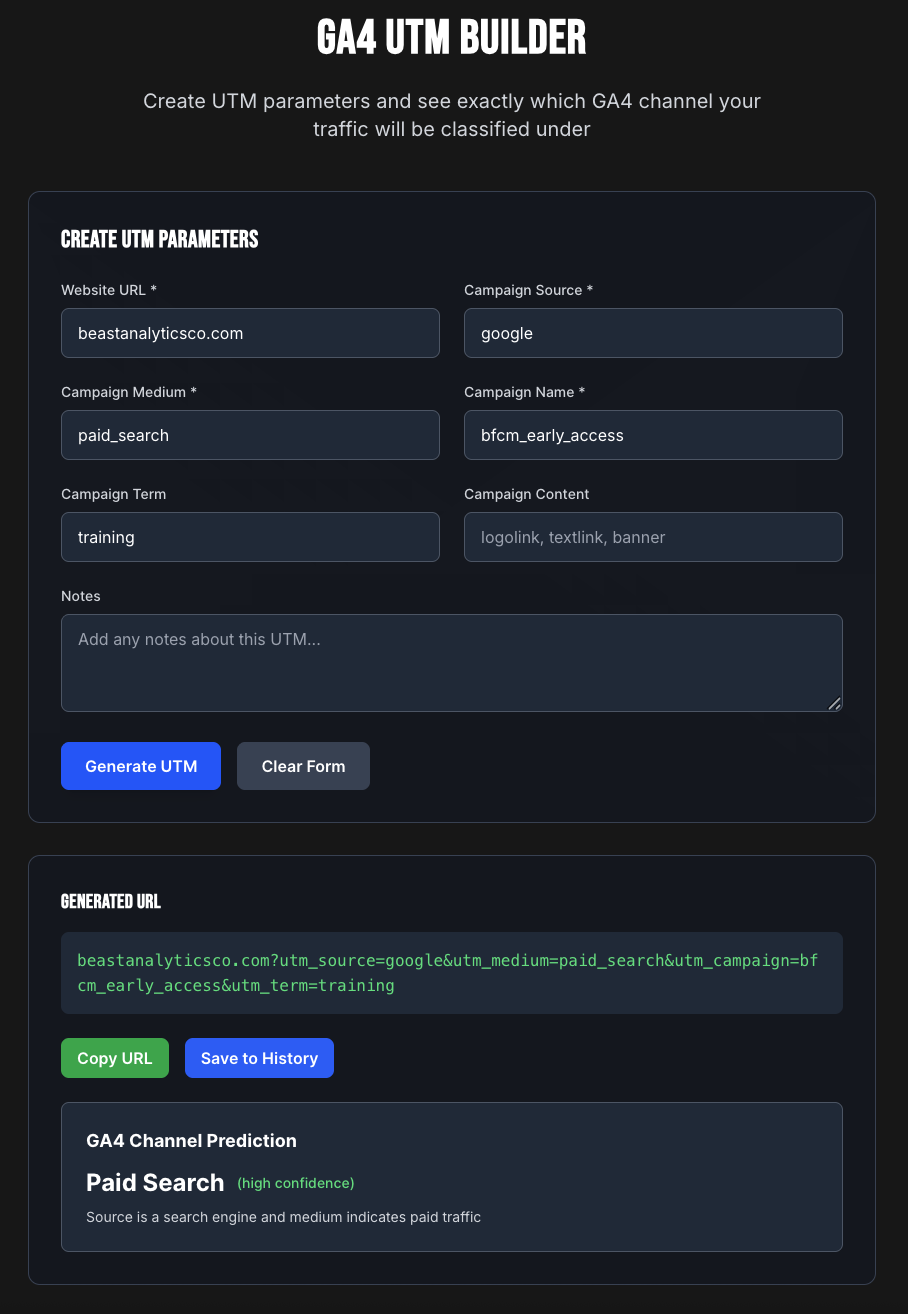
Why this matters for BFCM: If you want to see "all paid traffic" versus "all organic traffic" performance in GA4's standard reports, your UTM medium values need to align with these rules. Otherwise, you're adding a manual categorization step to every analysis.
BUT REMEMBER!!!!! You don't have to be constrained by these groupings. You can create custom channel groups, or you can follow my lead and bypass channel groupings entirely and report directly on your UTM dimensions instead 😅
How to Actually See Your BFCM Performance Data
Once your UTMs are live and traffic is flowing, you have several ways to analyze performance:
Standard GA4 Reports (With Limitations)
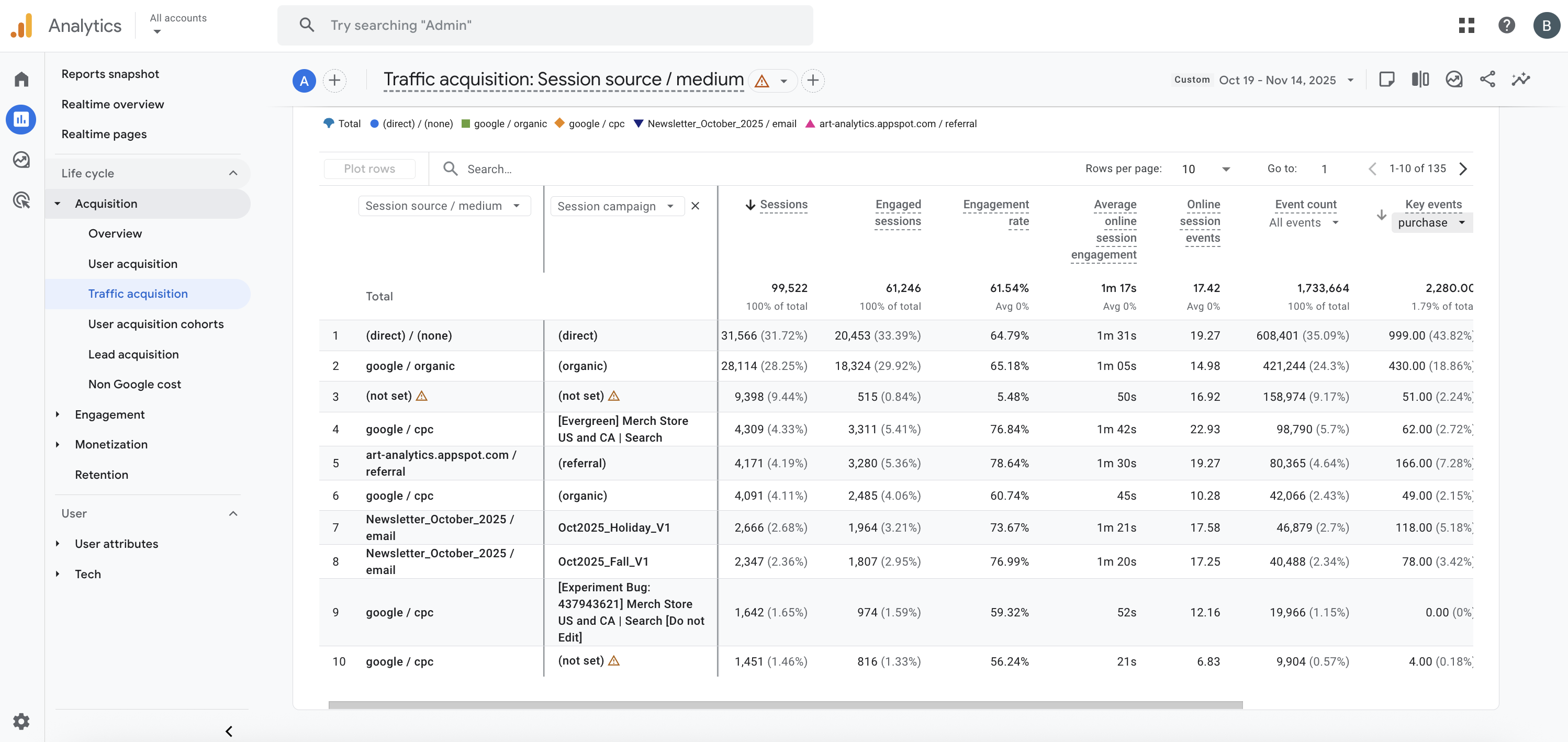
In GA4's standard reports, you'll primarily see:
Session source/medium - Shows your combined source and medium (e.g., "meta_facebook / paid_social")
Session campaign - Your utm_campaign values
Default channel grouping - GA4's interpretation of your traffic based on those rules above
How to access: Go to Reports > Acquisition > Traffic acquisition. The default dimension is "Session default channel group" but you can change it to "Session source/medium" or "Session campaign."
The limitation: You can only view two dimensions at a time. You can't easily see "Show me all meta_facebook traffic, broken down by campaign, then by content type." And you typically can't see utm_content or utm_creative_format in standard reports at all.
GA4 Explore (More Flexible)
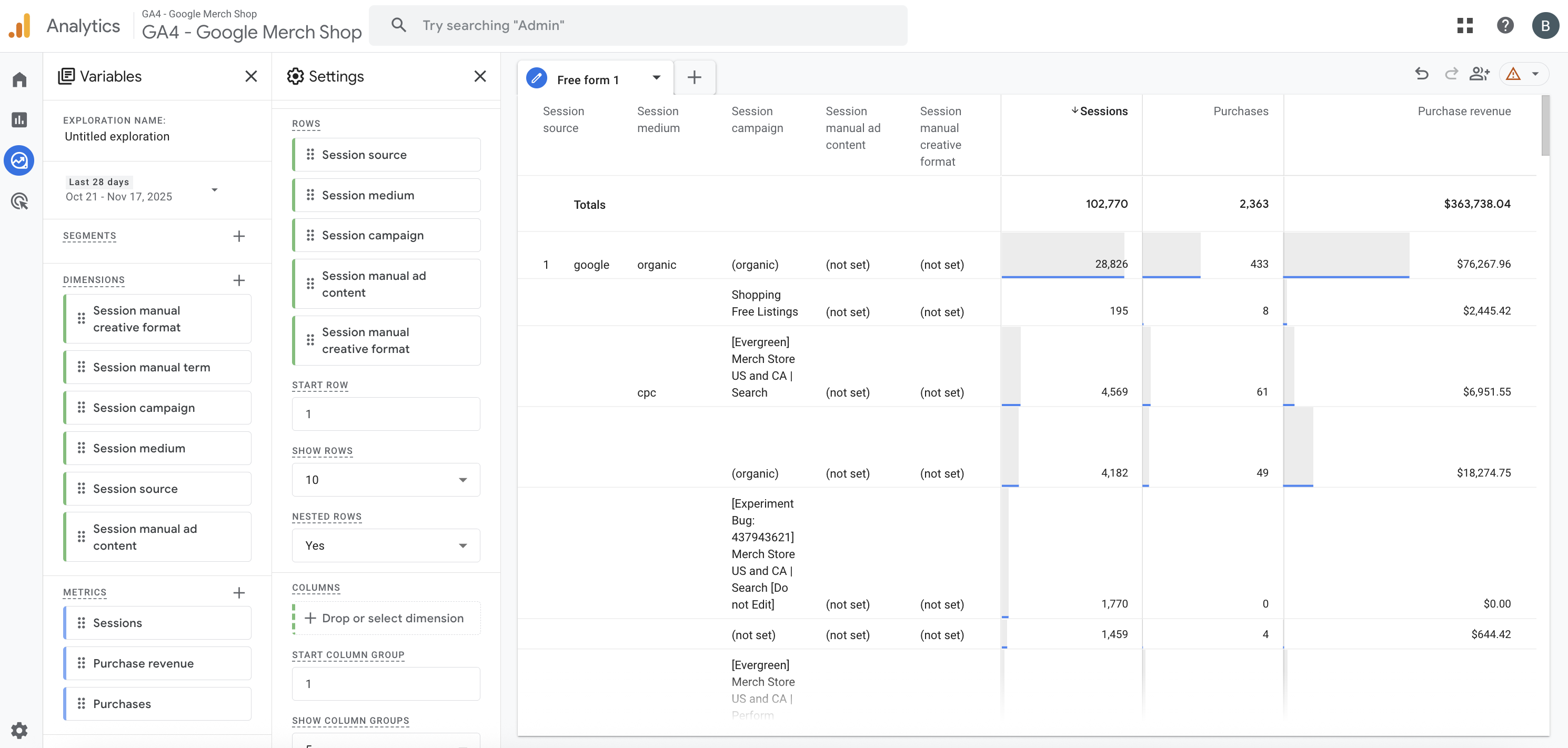
Explorations let you add multiple dimensions and metrics in flexible tables.
How to use for BFCM:
Go to Explore in GA4
Create a new Free Form exploration
Add dimensions:
Session source
Session medium
Session campaign
Session manual content (your utm_content)
Session manual creative format (your utm_creative_format)
Add metrics:
Sessions
Items purchased
Item revenue
Now you can build multi-dimensional tables to answer complex questions. The key is learning to use rows (for grouping) and filters (for isolating specific traffic).
The methodology:
Start with a filter to isolate the traffic you care about (e.g., Session campaign contains "bfcm" to see only Black Friday traffic)
Add row dimensions in the order you want to drill down (e.g., first by source, then by campaign, then by content)
Add your metrics (Sessions, Purchase revenue, Items purchased, etc.)
Example questions you can answer:
"Which channel drove the most BFCM revenue?"
Filter: Session campaign contains "bfcm"
Row: Session source
Metric: Purchase revenue
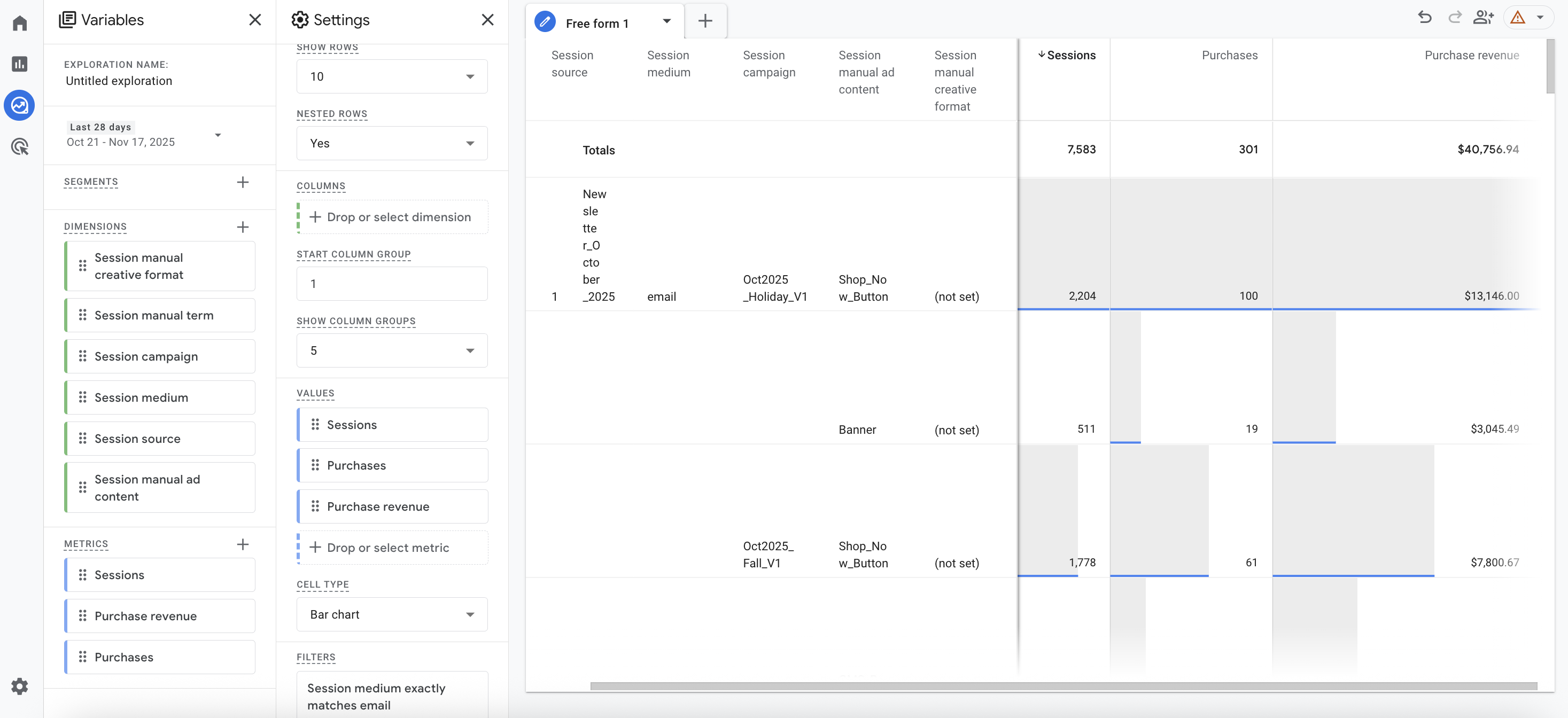
"For my email campaigns, which content type performed best?"
Filter: Session medium exactly matches "email" OR "blast" OR "flow"
Row: Session manual content
Metric: Sessions, Purchases, Purchase revenue
"How did my paid social creative variants compare?"
Filter: Session source contains your social platforms, Session medium exactly matches "paid_social"
Rows: Session source, then Session manual creative format
Metric: Purchase revenue
The power is in combining filters and dimensions to isolate and compare the specific segments you care about.
Looker Studio (The Most Flexible)
For ongoing BFCM reporting, especially if you're sharing with executives who want dashboards, Looker Studio gives you the most control.
What makes it better:
Combine all UTM dimensions in one table
Easily to use filters
Add calculated fields (revenue per session, conversion rate by campaign phase)
Create date comparisons (this Black Friday vs. last Black Friday)
Build channel-specific views that automatically filter to relevant UTM values
Strategic dashboard principles:
Rather than prescribing exact dashboards (since your UTM structure will be unique to your business), here's how to think about building BFCM reporting:
Page 1: Executive Overview
High-level KPIs: Total revenue, orders, AOV
Time-based performance: Daily/hourly trend charts to identify peak periods
Quick wins: Top 5 campaigns, sources, or content by revenue
Get the Looker Studio Monitoring Dashboard: https://lookerstudio.google.com/reporting/ace31bbc-a55b-45cc-9fd7-420bb17887e8
Page 2: Channel Performance
Create separate filtered sections for each major channel
Use source + medium filters to isolate channel traffic
Break down by your campaign structure to see phase/offer performance
Include conversion metrics: conversion rate, revenue per session, AOV
Page 3: Deep Dive Analysis
Build flexible tables with all UTM dimensions available
Let viewers filter by date range, channel, campaign phase
Show content and creative format performance
This is where stakeholders can explore "what if" questions
Page 4: Comparison Views
Year-over-year or campaign-to-campaign comparisons
Cohort analysis (early access vs. main event vs. extensions)
A/B test results (if running creative or offer tests)
Pro tip: Build your dashboard with filter controls at the top that let viewers select specific:
Date ranges
Campaign phases (using "contains" filters on campaign names)
Channels (using source or medium filters)
Products/offers (using content filters)
This makes one dashboard serve multiple analysis needs rather than creating separate static views for every question.
The cross-tab question: Use filters to ask "For [this specific segment], what performed best?" For example: "Among email traffic, which content type drove highest revenue?" or "For paid social, which creative format had the best ROAS?"
BFCM-Specific Tips and Examples
1. Plan for phases, not just "BFCM"
Don't use utm_campaign=black_friday for everything. You're likely running:
Early access (starts 11/20)
Pre-Black Friday teasers (11/21-11/23)
Black Friday main event (11/24)
Small Business Saturday (11/25)
Cyber Weekend (11/26-11/27)
Cyber Monday (11/28)
Cyber Week extensions (11/29-12/1)
Use your campaign parameter to differentiate:
bfcm_early_access-[product]-[audience]bfcm_bf_teaser-[product]-[audience]bfcm_bf_main-[product]-[audience]bfcm_cm_exclusive-[product]-[audience]
This lets you compare: "Did our early access generate better AOV than main event?" or "Should we invest more in Cyber Monday exclusives next year?"
2. Tag organic posts too
Your organic Instagram post about Black Friday? It needs UTMs. Your LinkedIn post? UTMs. Your TikTok bio link during BFCM? UTMs.
Without them, this traffic shows up as "direct / none" or generic "instagram.com / referral" and you lose the ability to see how organic social performed versus paid.
Example organic post UTM:
utm_source=instagram
utm_medium=social
utm_campaign=bfcm_bf_main-hero_product_a
utm_content=product
utm_creative_format=post_content_carousel
3. Use consistent product/offer naming across ALL channels
If you're promoting "Luxury Bundle" in emails, "luxury-bundle" in social ads, and "LUX_BUNDLE" in affiliate links, you've created three separate product lines in your reporting.
Choose one format (I recommend lowercase with underscores: luxury_bundle) and use it everywhere. Make this a required field in whatever system your team uses to generate links.
Also! Keep those links safe and sound.

Don’t want to use the GA4 Helper tool? Here is a Google Sheet you can copy and edit!
4. Don't forget about on-site promotion tracking
Your homepage banner linking to your Black Friday landing page? Create an event in Tag Manager and push it to Ga4. Your category page banners? Same thing!
This lets you see if on-site promotion drove significant secondary conversions.
5. Build your Looker Studio dashboard BEFORE launch
Don't wait until November 29th to start building reports. Create your BFCM dashboard now. This forces you to:
Confirm your UTM structure actually answers your questions
Identify gaps (oh wait, we need to track discount type)
Get stakeholder buy-in on what metrics matter
Ensure your data connections work
Come Black Friday, you'll be optimizing campaigns with live data, not troubleshooting reports.
The Real ROI of Strategic UTM Planning
Here's what changes when you implement a comprehensive UTM structure for BFCM:
During the campaign: You can see in real-time which offers, products, and channels are actually driving revenue, not just clicks or engagement. You can shift budget from underperforming creative to winners while the campaign is still live.
Post-campaign: You can answer which marketing activities justified their cost. Your affiliate team can see exactly which partners drove valuable traffic. Your creative team knows whether video or static images performed better. Your email team knows if promotional blasts or strategic flows converted more effectively.
For next year: You have a complete data set to model your 2026 BFCM strategy. You know which products to feature, which audiences to prioritize, which channels deserve more budget, and which creative styles to invest in.
The alternative: You spend six figures on BFCM marketing and emerge with vague directional insights, lots of arguments about attribution, and the nagging feeling that you're optimizing based on incomplete data.
Strategic UTM planning isn't about being pedantic about naming conventions. It's about building a measurement framework that turns your marketing spend into actionable intelligence.
Your team is about to execute hundreds of campaigns. The question is whether you'll be able to learn from them.
Need help building a UTM structure for your BFCM campaigns? Visit GA4Helper.com for UTM planning resources and tools, or reach out directly to discuss strategic analytics planning for high-volume campaigns.