

If you've been searching for your Google Analytics 4 attribution settings lately, you're not losing your mind. Google moved them in Q3 2025. And if you haven't checked your settings in a while (or ever), you could be making massive marketing decisions based on attribution models that don't actually reflect your buyer's journey. Not to scare you or anything 😅
Let me break down everything you need to know about GA4 attribution models, where to find them, and how to configure them so your marketing attribution actually makes sense for your business.
What are Attribution Models?
Attribution models determine how credit for conversions (called "key events" in GA4) gets distributed across your marketing touchpoints.
Think about it this way: if someone discovers your brand through an Instagram ad, comes back three days later via Google search, then converts a week later by clicking a Facebook retargeting ad, which channel gets credit for that sale?
That's what your GA4 attribution settings control.
Where to Find Your GA4 Attribution Settings (Updated 2025 Location)
IMPORTANT: Google moved the attribution settings in 2025.
To access them now:
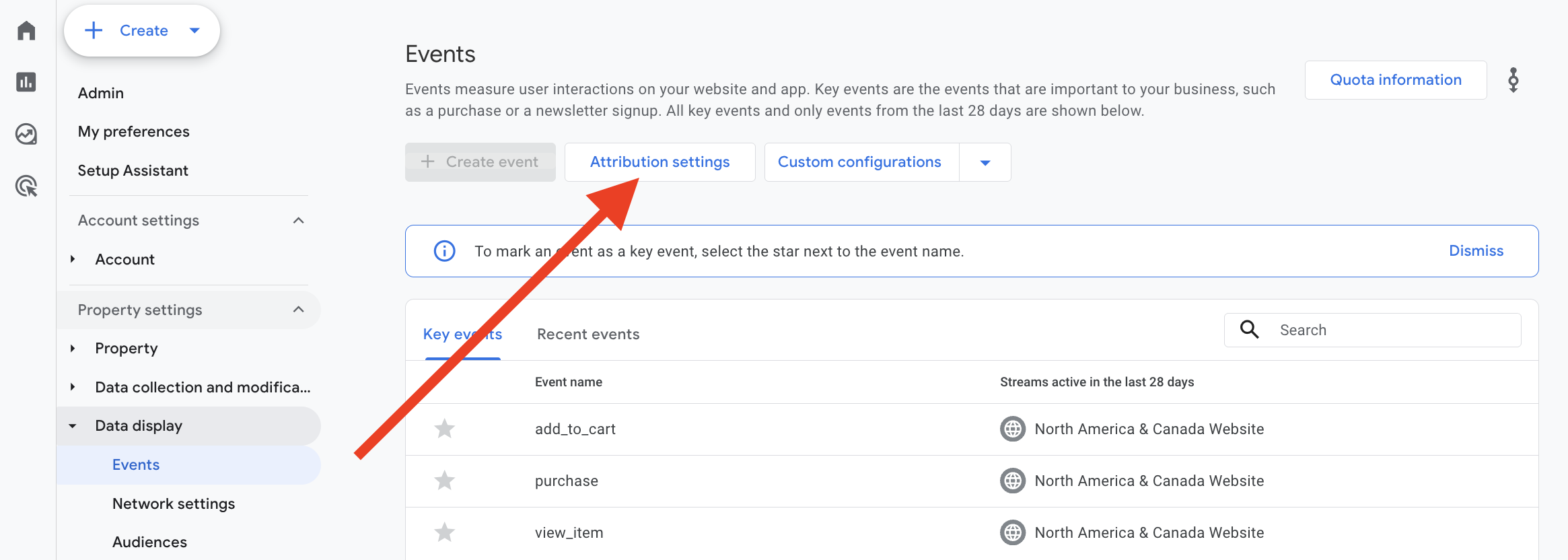
Go to Admin in your GA4 property
Under Data Display, select "Events"
Above the table of events, select the "Attribution settings" button
Understanding Your GA4 Attribution Model Options
When you open your attribution settings, you'll see the reporting attribution model with really only two choices:
Data-driven attribution
(recommended for most businesses)
Last click attribution
There's also a last-click option specific to Google paid channels, but let's focus on the main two.
Why I Recommend Data-Driven Attribution
Here's the thing: data-driven attribution only affects specific dimensions in your reports, and those dimensions aren't even used in the standard Reports section out of the box.
Your attribution settings are only applied to attribution dimensions WITHOUT a "session" or "first user" prefix.
For example:
Source (without "session" or "first user" prefix)
Medium (without "session" or "first user" prefix)
Campaign (without "session" or "first user" prefix)
If you're using session source or first user source in your reports, you're essentially getting last-touch or first-touch attribution regardless of your attribution model setting.
Another important point! These dimensions ONLY work with the Key Event metric.
Where Marketing Attribution Actually Matters in GA4
Your attribution model primarily impacts:
The Advertising section
- This is where you'll see multi-touch conversions with proper data-driven attribution
Explore reports
- When you use those attribution dimensions (source, medium, campaign without prefixes)
Google Ads optimization
- Your attribution settings affect how conversion data flows back to Google Ads
How Data-Driven Attribution Works
Data-driven attribution looks at all the touchpoints a user has had with your brand, analyzes what they did during each interaction, and assigns a percentage of credit to each touchpoint.
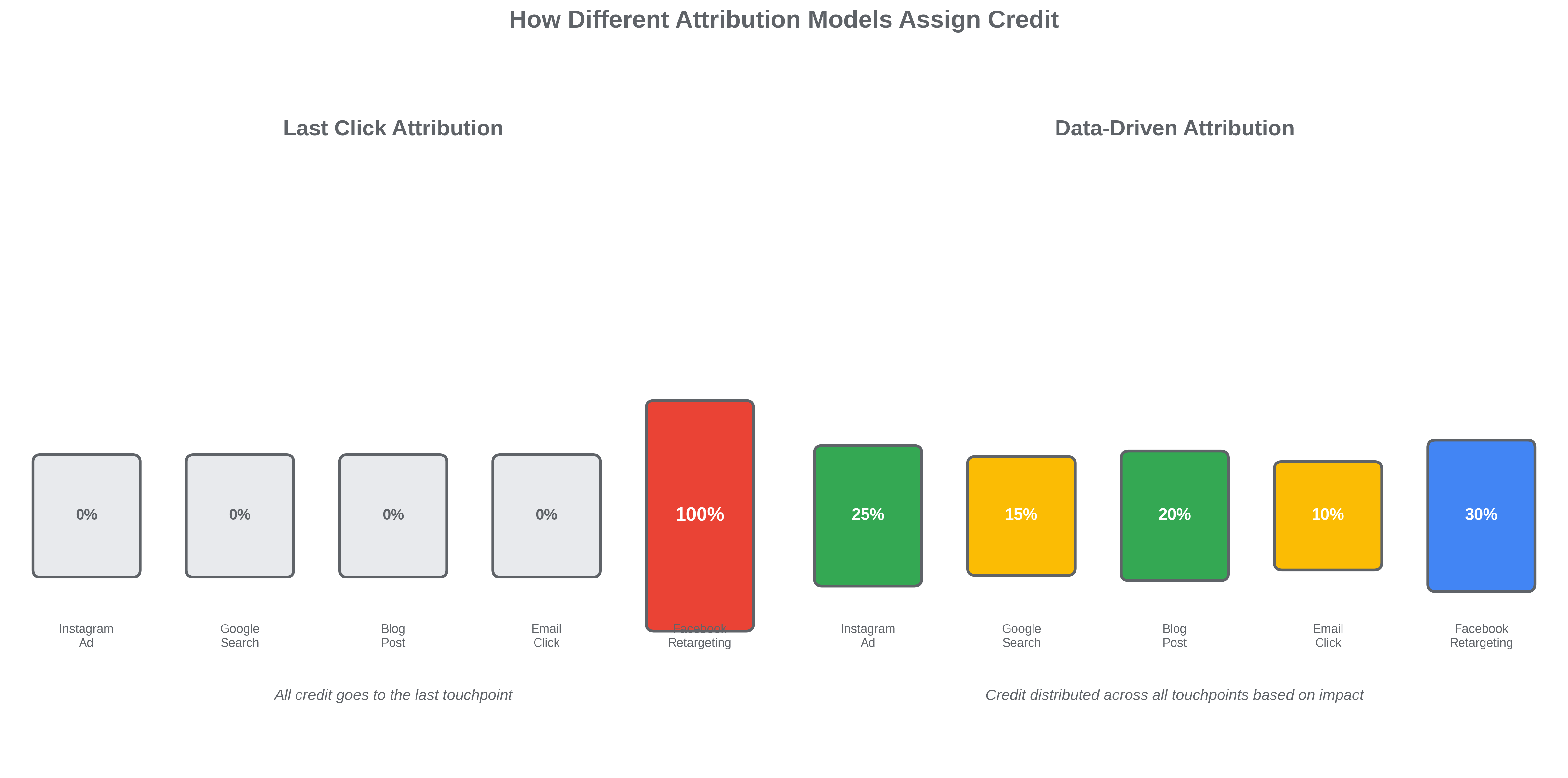
So instead of giving 100% credit to the last click (which might've been a branded search where they were already going to buy), it distributes credit across the Instagram ad that introduced them, the blog post that educated them, and the retargeting ad that brought them back.
This is incredibly helpful for understanding how your marketing channels work together.
Google Paid Channels Settings: Paid Only vs. Paid and Organic
Once you link a Google Ads account to GA4, you'll get an additional option to give credit to specific channels. The options are:
Only Google paid channels, OR
Google paid AND organic channels
I always recommend choosing paid and organic channels. Here's why:
It sends more conversion data to Google Ads
You get richer insights in your key events reports
It provides a more complete picture in your advertising section
It helps Google Ads optimization algorithms work better
GA4 Key Event Lookback Windows: 30, 60, or 90 Days?
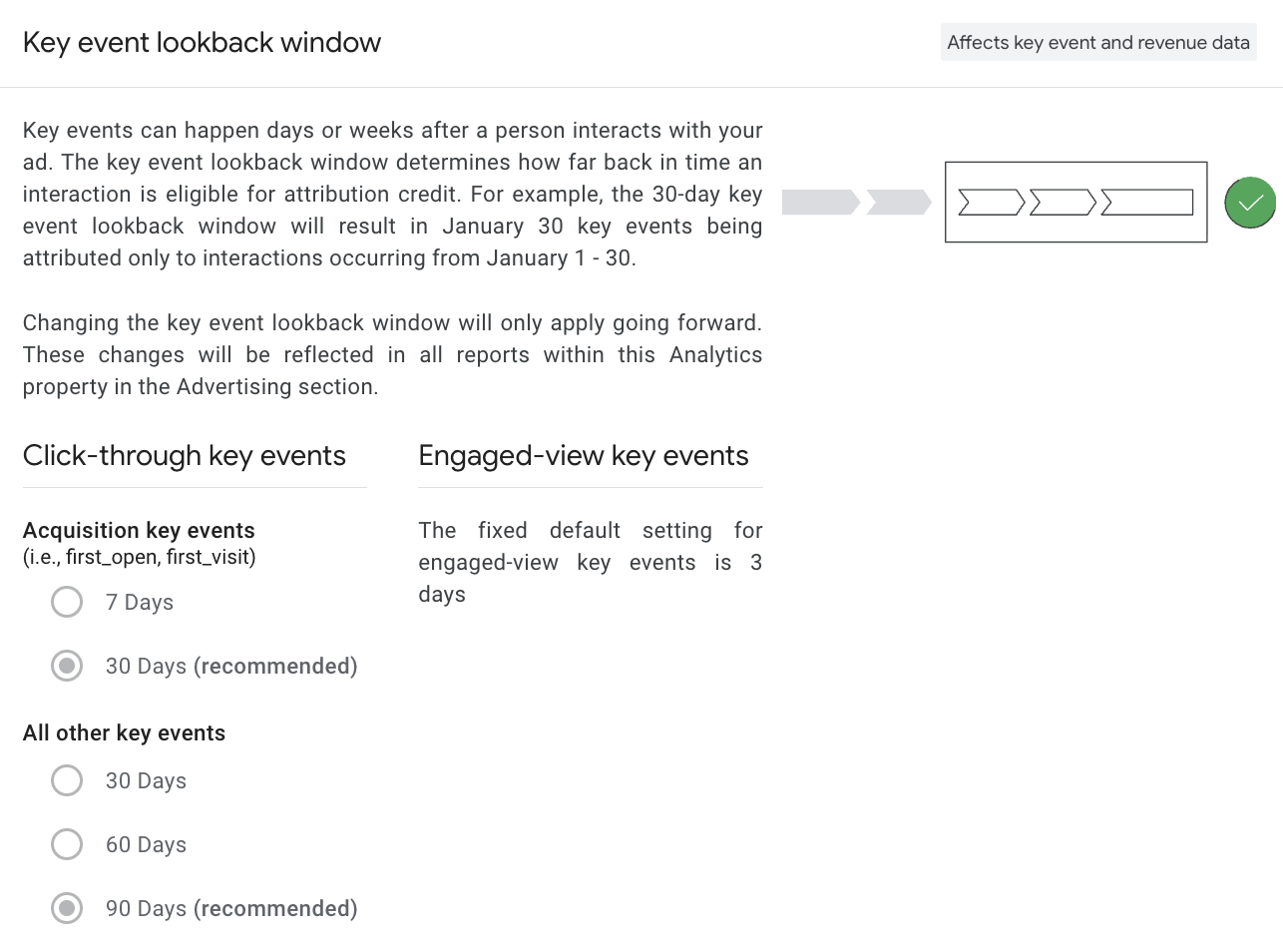
Your key event lookback window determines how far back GA4 looks to assign attribution credit.
The Options:
30-day lookback window
60-day lookback window
90-day lookback window
(There's also a setting for acquisition key events, but honestly? I absolutely positively despise acquisition key events because they're just key events that fire whenever you get a new user, which gives you artificially high conversion rates and isn't very helpful.)
How to Choose the Right Lookback Window
Here's what's important to understand: even with a 90-day lookback window, if someone's first touchpoint was 89 days ago, and they barely engaged, data-driven attribution won't give much (if any) credit to that touchpoint.
For most businesses, 90 days is fine.
But if you're selling something cheap (like a $15 digital download) and users have multiple quick touchpoints before converting, a 30-day lookback window might make more sense.
The key is to match your lookback window to your actual buyer's journey.
Why Your GA4 Attribution Settings Actually Matter
Your attribution settings affect:
How conversion data flows to Google Ads (depending on your campaign setup)
How key events are reported in the advertising section
How you understand which marketing channels are actually driving results
Where you allocate budget based on multi-touch attribution data
If your settings don't reflect your buyer's journey, you're essentially making marketing decisions based on incomplete information.
My Recommendation for GA4 Attribution Settings
For most businesses, I recommend:
✅ Reporting attribution model: Data-driven ✅ Channel Credit: Paid and organic ✅ Key event lookback window: 90 days (adjust based on your sales cycle)
The most important thing? Know what your settings are. Too many businesses have no idea their attribution model is set to last-click or that their lookback window is only 30 days when their average sales cycle is 60+ days.
Your marketing attribution should reflect the reality of complex user journeys, not just give credit to whichever channel happened to be last.